Introduction
Want to rank higher on google ? The answer is on-page seo.
Let’s start with what on-page SEO is. It includes all the optimization you do on your website. This includes titles, headings, content, images and internal links.
For example, a well optimized page can rank on page one. A poorly optimized page may never be found.
Therefore, On-page SEO learning is a must. This on page seo 2026 guide will teach you everything you need to know. Finally, you’ll know exactly how to optimize every page you write.
For official guidelines, read the Google SEO Starter Guide.
What You Will Learn
How to optimize title tags for clicks
Writing meta descriptions that get results
Using headings to structure content
Creating SEO-friendly content
Optimizing images for search
Building smart internal links
Chapter 1: Optimize Your Title Tags
The title tag is the most important SEO element you have. It’s the headline you see in Google search results that you can click on.
To begin with, add your primary keyword to the title. Placing it near the top will have the most impact.
Then, your title needs to be 50 to 60 characters. Longer titles are truncated in search results.
“Complete Guide to Optimizing Content” is a good title.
And lastly, make your title intriguing. People decide whether to click based on the title.
Pro tip: Use numbers or power words like “complete,” “ultimate,” or “guide” for more clicks.
Chapter 2: Write Compelling Meta Descriptions
Meta descriptions don’t directly affect rankings. But they have a big effect on click-through rates.
First, make sure your meta description is between 120 and 155 characters long. Anything longer is cut off by Google.
Then, organically add your target keyword. Google bolds the words that match in the search results.
Learn on-page SEO in 2026. Learn how to optimize titles, headings, content and images for better Google rankings.
And then a call to action finally. Words like ‘learn’, ‘discover’ and ‘get started’ entice clicks.
Chapter 3: Use Headings to Structure Content
Headings help Google determine the structure of your content. They also make your article easier to read for people.
## One H1 heading per page First, use one H1 heading per page. This should be your big title.
Then use H2 headings for the main sections. They divide your content into logical sections.
This article, for example, uses H2 headings for each chapter. H3 headings denote sub-points within each chapter.
Lastly, use some keywords in your headings. This indicates relevance to Google without over-optimization.
Chapter 4: Create SEO-Friendly Content
Content Quality Content quality is the number one ranking factor. Google aims to provide the best answer to every search question.
First, at least 1,500 words for major pages. Generally, longer content ranks better than shorter content.
Then make your content original and valuable. Do not copy content from other sites.
Add in unique examples, original data or personal experience for example. No one else can duplicate these things.
Finally, keep your content fresh. New content signals to Google that your site is alive and well-maintained.
Pro tip: Shorten short paragraphs. Use bullet points, numbered lists, and images to improve readability.
Chapter 5: Optimize Your Images for SEO
Images can drive traffic from Google Image Search. They also make your content easier to read and more engaging.
Rename your image files before uploading them. The first is a two-day training workshop on the design and use of a new user-interface for the company’s data-base and the second is a one-day seminar on the use of the new software.
For example, “on-page-seo-guide-2026.jpg” is better than “IMG_12345.jpg”
Then add alt text to all images. Alt text describes an image for search engines and screen readers.
For example, good alt text would look like this: “on page seo 2026 content optimization checklist”
Last, reduce your pictures to lower file size. Smaller images load faster, which is great for your page speed rankings.
Pro tip: Try free tools like ShortPixel or Imagify to compress images without losing quality.
Check your page speed for free using Google PageSpeed Insights.
Chapter 6: Build Smart Internal Links
Internal links are links from one page on your site to another. They help google to find all your page.
First, connect to your most important pages from your homepage. This tells Google what content is most important.
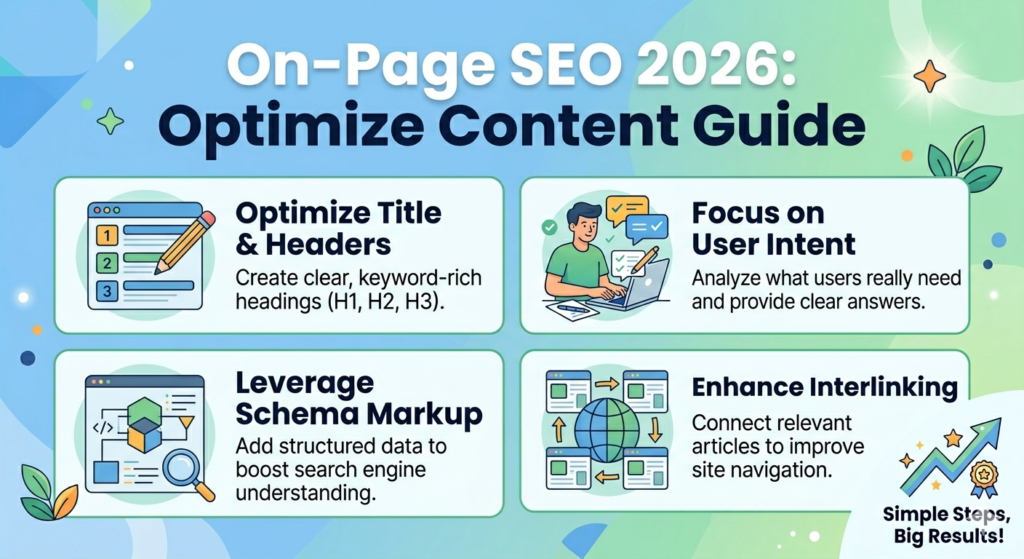
Then, use descriptive anchor text in your links. For the full interactive version of this infographic click on the image below.
e.g., “Check out our comprehensive on-page SEO guide for more optimization tips.”
Finally, every new post should have 3-5 internal links. Link to your older relevant content wherever possible.
Chapter 7: Optimize Your URL Structure
URLs help Google understand what your page is about. Clean URLs also get more clicks from searchers.
First, keep your URLs short and simple. Remove unnecessary words like “a,” “an,” “the,” and “and.”
Then, include your target keyword in the URL. Use hyphens to separate words.
For example: “yourwebsite.com/on-page-seo-2026-guide“ works well.
Finally, avoid using numbers, dates, or special characters. Clean URLs look more professional.
Chapter 8: Improve Readability for Users
Readability is not a direct ranking signal. But it does affect engagement metrics that Google uses.
Write short sentences first. The idea is to have 15-20 word sentences, max.
Then use transition words like “first,” “then,” “for example,” and “finally.” They make your content flow better.
For example paragraphs should be 2-4 sentences. Long paragraphs turn readers off.
1. Last of all: * bulleted list 1. numbered list These separate text and make it easy to scan.
Common On-Page SEO Mistakes
Mistake 1: Keyword stuffing. Adding keywords too many times looks unnatural. Use keywords naturally instead.
Mistake 2: Duplicate content. Copying content from other pages confuses Google. Always create original content.
Mistake 3: Ignoring mobile users. Over half of searches happen on phones. Make sure your site looks good on mobile.
Mistake 4: Forgetting image alt text. Images without alt text miss an SEO opportunity. Add alt text to every image.
Therefore, avoid these common mistakes. Your rankings will improve as a result.
Quick Summary Checklist
Element
Title tag
Meta description
Headings
Content
Images
Internal links
URL
Readability
Action
Include keyword, 50-60 chars
Include keyword, 120-155 chars
One H1, multiple H2/H3
1,500+ words, original
Descriptive filename + alt text
3-5 per post
Short, keyword included
Short sentences, transition words
Your 7-Day On-Page SEO Action Plan ere
Day
1
2
3
4
5
6
7
Task
Optimize your homepage title and meta description
Check that every page has only one H1 heading
Add alt text to 20 images on your site
Write one new 1,500+ word blog post
Add internal links to 5 old posts
Clean up your URLs (remove numbers and dates)
Review and improve your oldest 3 posts
📚 Read my complete marketing series:
Google Ads Bidding Strategies 2026: How to Set Your Budget & Bids for Successa
Google Ads Keyword Research: How to Find Winning Keywords in 2026
Google Ads for Beginners 2026: How to Set Up Your First Campaign
Affiliate Marketing Guide 2026 How to Begin Grow and Make Ongoing Income
How to Start Affiliate Marketing in 2026: Complete Beginner’s Guide
Final Thoughts
Now you know how to optimize every page on your site. This on page seo 2026 guide covered titles, meta descriptions, headings, content, images, internal links, URLs, and readability. For the latest SEO updates, follow the Google Search Central Blog.
Your three tasks for this week:
Optimize your homepage title and meta description
Add alt text to all images on your top 5 posts
Write one new 1,500+ word post using these on-page SEO tips
Finally, on-page SEO is completely in your control. You can start optimizing today without waiting for anyone else.